Featured image of post GAMES101 现代计算机图形学入门 Assignment3

GAMES101 现代计算机图形学入门 Assignment3

作业描述

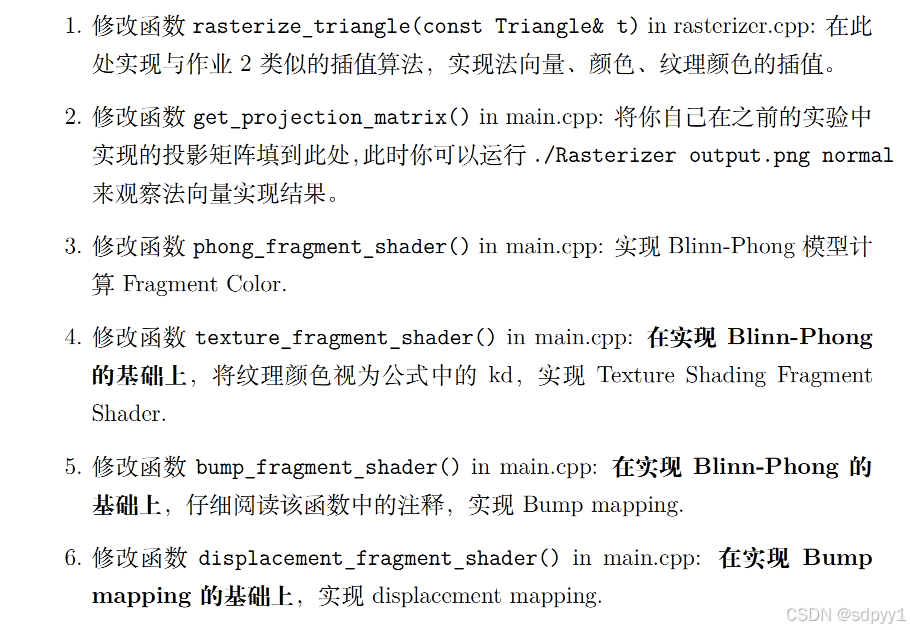
上节课已经对光栅化的操作有了了解,这节课直接引入了模型和纹理,其实本质就是引入了很多的顶点,操作其实没什么变化请添加图片描述

  1. 和上次一样,只不过要插值更多的东西
  2. copy以前的投影矩阵即可
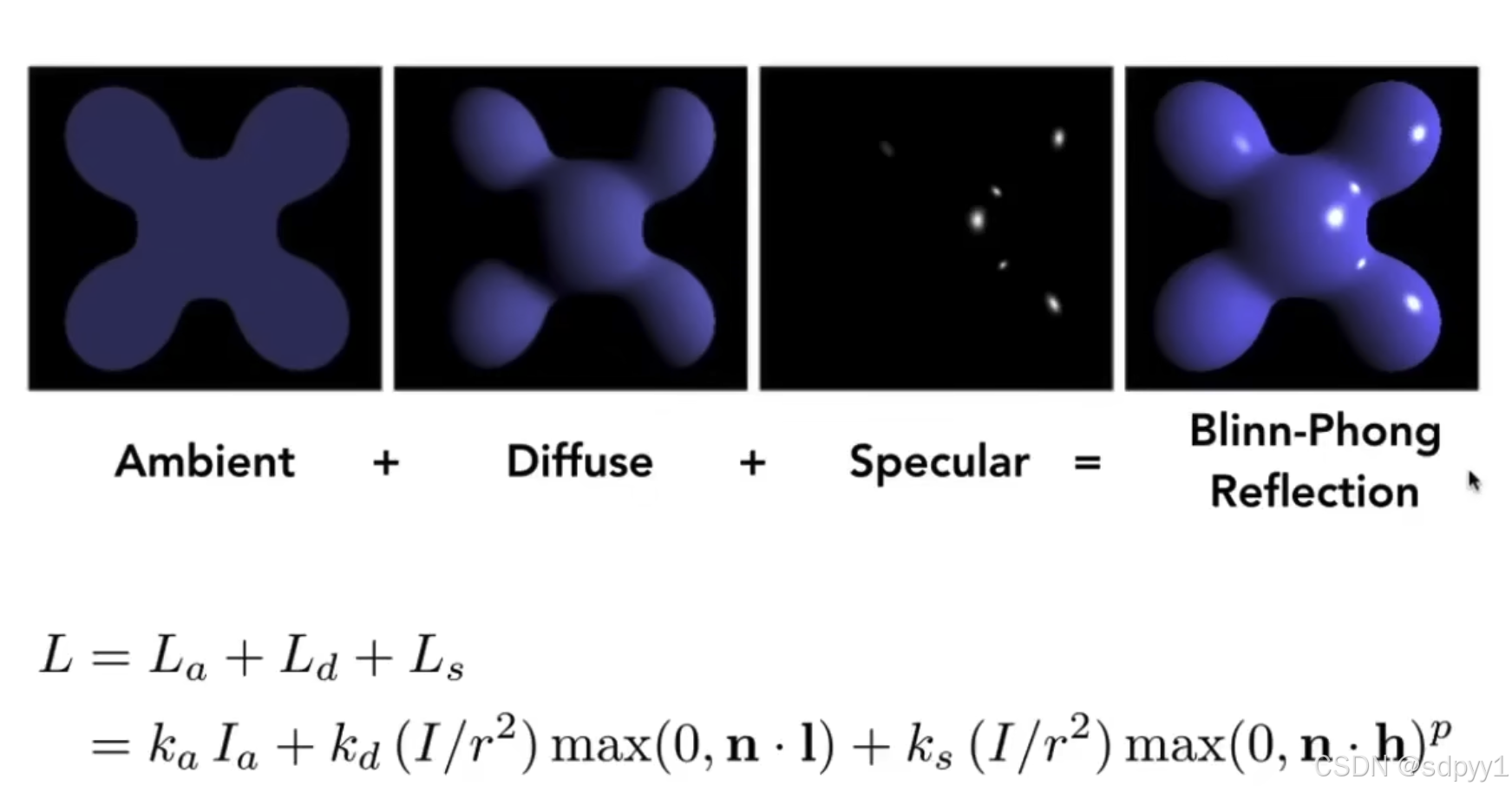
  3. 实现Blinn-Phong的光照模型,本质就是对每个像素的颜色值进行处理,把插值出来的颜色作为了漫反射的系数,另外还需要考虑高光反射和环境光
  4. 把材质搬进来,漫反射系数不再使用插值算法,而是由材质提供
  5. Bump mapping
  6. 待学习

法向量、纹理颜色插值

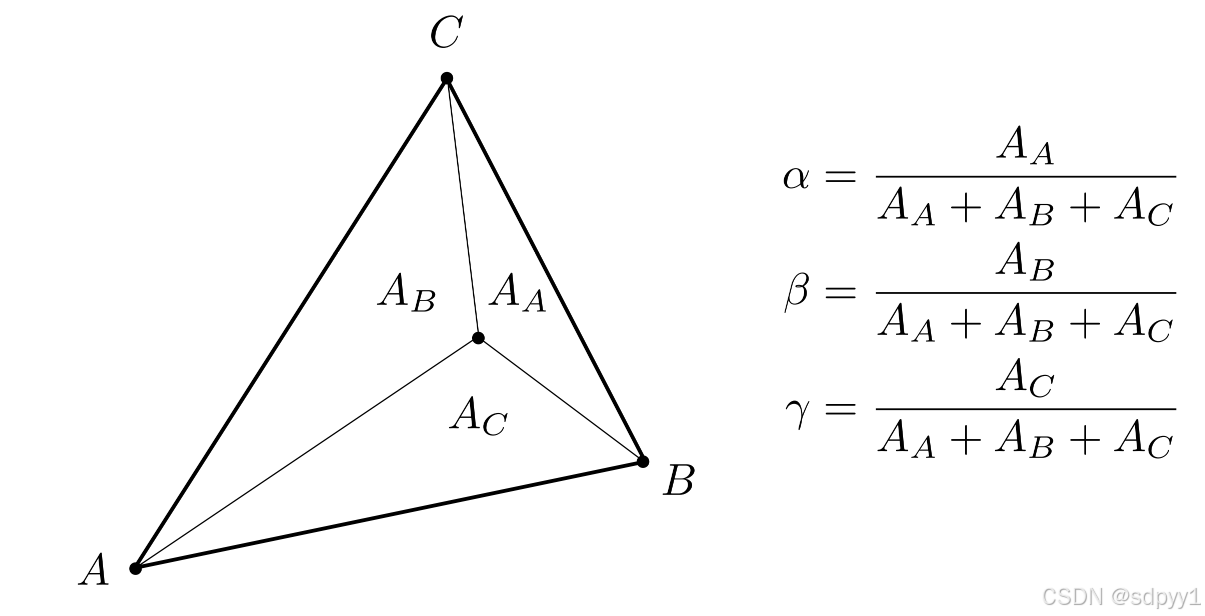
通过重心坐标进行插值,每个像素点的重心坐标计算公式如下,$A_A$是面积 请添加图片描述 重心坐标计算代码如下

1
2
3
4
5
6
static std::tuple<float, float, float> computeBarycentric2D(float x, float y, const Vector4f* v){
    float c1 = (x*(v[1].y() - v[2].y()) + (v[2].x() - v[1].x())*y + v[1].x()*v[2].y() - v[2].x()*v[1].y()) / (v[0].x()*(v[1].y() - v[2].y()) + (v[2].x() - v[1].x())*v[0].y() + v[1].x()*v[2].y() - v[2].x()*v[1].y());
    float c2 = (x*(v[2].y() - v[0].y()) + (v[0].x() - v[2].x())*y + v[2].x()*v[0].y() - v[0].x()*v[2].y()) / (v[1].x()*(v[2].y() - v[0].y()) + (v[0].x() - v[2].x())*v[1].y() + v[2].x()*v[0].y() - v[0].x()*v[2].y());
    float c3 = (x*(v[0].y() - v[1].y()) + (v[1].x() - v[0].x())*y + v[0].x()*v[1].y() - v[1].x()*v[0].y()) / (v[2].x()*(v[0].y() - v[1].y()) + (v[1].x() - v[0].x())*v[2].y() + v[0].x()*v[1].y() - v[1].x()*v[0].y());
    return {c1,c2,c3};
}

插值算法使用如下

1
2
3
4
static Eigen::Vector3f interpolate(float alpha, float beta, float gamma, const Eigen::Vector3f& vert1, const Eigen::Vector3f& vert2, const Eigen::Vector3f& vert3, float weight)
{
    return (alpha * vert1 + beta * vert2 + gamma * vert3) / weight;
}

具体的使用如下

1
2
3
4
5
6
7
8
//color interpolate
auto interpolated_color = interpolate(alpha,beta,gamma,t.color[0],t.color[1],t.color[2],1);
//normal vector interpolate
auto interpolated_normal = interpolate(alpha,beta,gamma,t.normal[0],t.normal[1],t.normal[2],1).normalized();
//texture coordinates interpolate
auto interpolated_texcoords = interpolate(alpha,beta,gamma,t.tex_coords[0],t.tex_coords[1],t.tex_coords[2],1);
//shading point coordinates interpolate  这个东西是为了记录每个像素点是在哪个方向上观察他的,同于计算光照
auto interpolated_shadingcoords = interpolate(alpha,beta,gamma,view_pos[0],view_pos[1],view_pos[2],1);

Blinn-Phong的光照模型

听过课肯定都懂了,直接写进代码即可 请添加图片描述

 1
 2
 3
 4
 5
 6
 7
 8
 9
10
11
12
13
14
15
16
17
18
19
20
21
22
23
24
25
26
27
28
29
30
31
32
33
34
35
36
37
38
39
40
41
42
43
44
45
46
47
48
Eigen::Vector3f phong_fragment_shader(const fragment_shader_payload& payload)
{
    // ka kd ks 是三种光的系数
    Eigen::Vector3f ka = Eigen::Vector3f(0.005, 0.005, 0.005);
    Eigen::Vector3f kd = payload.color;
    Eigen::Vector3f ks = Eigen::Vector3f(0.7937, 0.7937, 0.7937);

    // l1 l2表示有两个光源,里边的内容是位置和强度
    auto l1 = light{{20, 20, 20}, {500, 500, 500}};
    auto l2 = light{{-20, 20, 0}, {500, 500, 500}};

    std::vector<light> lights = {l1, l2};
    // 环境光强度
    Eigen::Vector3f amb_light_intensity{10, 10, 10};
    Eigen::Vector3f eye_pos{0, 0, 10};

    // 高光的指数,越大对角度越敏感
    float p = 150;

    Eigen::Vector3f color = payload.color;
    Eigen::Vector3f point = payload.view_pos;
    Eigen::Vector3f normal = payload.normal;

    Eigen::Vector3f result_color = {0, 0, 0};
    for (auto& light : lights)
    {
        // 计算点到光源的向量
        Eigen::Vector3f light_vec = light.position - point;
        // 计算点到光源的距离
        float r = light_vec.norm();
        // 归一化从点到光源的向量
        Eigen::Vector3f light_dir = light_vec.normalized();

        // 漫反射
        Eigen::Vector3f diffuse = kd.cwiseProduct(light.intensity / (r * r)) * std::max(0.0f, normal.dot(light_dir));

        // 高光反射
        // 计算从表面点到观察者的向量
        Eigen::Vector3f view_dir = (eye_pos - point).normalized();
        // 计算半程向量
        Eigen::Vector3f halfVector = (light_dir + view_dir).normalized();
        Eigen::Vector3f specular = ks.cwiseProduct(light.intensity / (r * r)) * std::pow(std::max(0.0f, normal.dot(halfVector)), p);

        result_color += (diffuse + specular + ka.cwiseProduct(amb_light_intensity));
    }

    return result_color * 255.f;
}

这里边环境光是对于每个光源自带的么,为什么每个光源都要计算一次,而不是全局计算一次,有无懂哥?

纹理颜色视为公式中的 kd

根据插值出来的纹理坐标为每个像素提供对应在纹理图片中的颜色,与上一步区别就是漫反射系数换成了纹理颜色

 1
 2
 3
 4
 5
 6
 7
 8
 9
10
11
12
13
14
15
16
17
18
19
20
21
22
23
24
25
26
27
28
29
30
31
32
33
34
35
36
37
38
39
40
41
42
43
44
45
46
47
48
49
50
51
52
53
54
55
56
57
58
Eigen::Vector3f texture_fragment_shader(const fragment_shader_payload& payload)
{
    Eigen::Vector3f return_color = {0, 0, 0};
    if (payload.texture)
    {
        // TODO: Get the texture value at the texture coordinates of the current fragment
        return_color = payload.texture->getColor(payload.tex_coords.x(),payload.tex_coords.y());

    }
    Eigen::Vector3f texture_color;
    texture_color << return_color.x(), return_color.y(), return_color.z();

    Eigen::Vector3f ka = Eigen::Vector3f(0.005, 0.005, 0.005);
    Eigen::Vector3f kd = texture_color / 255.f;
    Eigen::Vector3f ks = Eigen::Vector3f(0.7937, 0.7937, 0.7937);

    auto l1 = light{{20, 20, 20}, {500, 500, 500}};
    auto l2 = light{{-20, 20, 0}, {500, 500, 500}};

    std::vector<light> lights = {l1, l2};
    Eigen::Vector3f amb_light_intensity{10, 10, 10};
    Eigen::Vector3f eye_pos{0, 0, 10};

    float p = 150;

    Eigen::Vector3f color = texture_color;
    Eigen::Vector3f point = payload.view_pos;
    Eigen::Vector3f normal = payload.normal;

    Eigen::Vector3f result_color = {0, 0, 0};

    for (auto& light : lights)
    {
        // TODO: For each light source in the code, calculate what the *ambient*, *diffuse*, and *specular*
        // components are. Then, accumulate that result on the *result_color* object.
        // 计算点到光源的向量
        Eigen::Vector3f light_vec = light.position - point;
        // 计算点到光源的距离
        float r = light_vec.norm();
        // 归一化从点到光源的向量
        Eigen::Vector3f light_dir = light_vec.normalized();

        // 漫反射
        Eigen::Vector3f diffuse = kd.cwiseProduct(light.intensity / (r * r)) * std::max(0.0f, normal.dot(light_dir));

        // 高光反射
        // 计算从表面点到观察者的向量
        Eigen::Vector3f view_dir = (eye_pos - point).normalized();
        // 计算半程向量
        Eigen::Vector3f halfVector = (light_dir + view_dir).normalized();
        Eigen::Vector3f specular = ks.cwiseProduct(light.intensity / (r * r)) * std::pow(std::max(0.0f, normal.dot(halfVector)), p);

        result_color += (diffuse + specular + ka.cwiseProduct(amb_light_intensity));

    }

    return result_color * 255.f;
}

Bump mapping

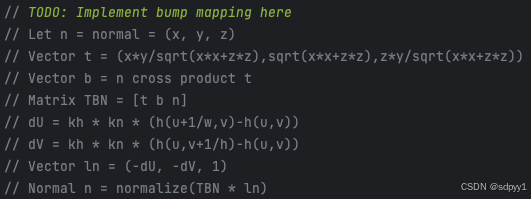
源码给了一个示例来参考 通过扰动表面法线方向‌(而非实际修改几何形状)来制造光照上的明暗变化 请添加图片描述 按照上述代码对传进来的像素的法线进行处理,最后的颜色就是法线值

 1
 2
 3
 4
 5
 6
 7
 8
 9
10
11
12
13
14
15
16
17
    float x = normal.x();
    float y = normal.y();
    float z = normal.z();
    Eigen::Vector3f t{ x * y / std::sqrt(x * x + z * z), std::sqrt(x * x + z * z), z*y / std::sqrt(x * x + z * z) };
    Eigen::Vector3f b = normal.cross(t);
    Eigen::Matrix3f TBN;
    TBN <<  t.x(), b.x(), normal.x(),
            t.y(), b.y(), normal.y(),
            t.z(), b.z(), normal.z();
    float u = payload.tex_coords.x();
    float v = payload.tex_coords.y();
    float w = payload.texture->width;
    float h = payload.texture->height;
    float dU = kh * kn * (payload.texture->getColor(u + 1 / w , v).norm() - payload.texture->getColor(u, v).norm());
    float dV = kh * kn * (payload.texture->getColor(u, v + 1 / h).norm() - payload.texture->getColor(u, v).norm());
    Eigen::Vector3f ln{-dU, -dV, 1};
    Eigen::Vector3f result_color = (TBN * ln).normalized();

完整代码如下

 1
 2
 3
 4
 5
 6
 7
 8
 9
10
11
12
13
14
15
16
17
18
19
20
21
22
23
24
25
26
27
28
29
30
31
32
33
34
35
36
37
38
39
40
41
42
Eigen::Vector3f bump_fragment_shader(const fragment_shader_payload& payload)
{

    Eigen::Vector3f ka = Eigen::Vector3f(0.005, 0.005, 0.005);
    Eigen::Vector3f kd = payload.color;
    Eigen::Vector3f ks = Eigen::Vector3f(0.7937, 0.7937, 0.7937);

    auto l1 = light{{20, 20, 20}, {500, 500, 500}};
    auto l2 = light{{-20, 20, 0}, {500, 500, 500}};

    std::vector<light> lights = {l1, l2};
    Eigen::Vector3f amb_light_intensity{10, 10, 10};
    Eigen::Vector3f eye_pos{0, 0, 10};

    float p = 150;

    Eigen::Vector3f color = payload.color;
    Eigen::Vector3f point = payload.view_pos;
    Eigen::Vector3f normal = payload.normal;


    float kh = 0.2, kn = 0.1;
    // 这个地方是为了后面用局部坐标系,让n始终朝向001,课上讲过
    float x = normal.x();
    float y = normal.y();
    float z = normal.z();
    Eigen::Vector3f t{ x * y / std::sqrt(x * x + z * z), std::sqrt(x * x + z * z), z*y / std::sqrt(x * x + z * z) };
    Eigen::Vector3f b = normal.cross(t);
    Eigen::Matrix3f TBN;
    TBN <<  t.x(), b.x(), normal.x(),
            t.y(), b.y(), normal.y(),
            t.z(), b.z(), normal.z();
    float u = payload.tex_coords.x();
    float v = payload.tex_coords.y();
    float w = payload.texture->width;
    float h = payload.texture->height;
    float dU = kh * kn * (payload.texture->getColor(u + 1 / w , v).norm() - payload.texture->getColor(u, v).norm());
    float dV = kh * kn * (payload.texture->getColor(u, v + 1 / h).norm() - payload.texture->getColor(u, v).norm());
    Eigen::Vector3f ln{-dU, -dV, 1};
    Eigen::Vector3f result_color = (TBN * ln).normalized();
    return result_color * 255.f;
}

displacement mapping

这种应用层面的东西目前不是很想深究,不过它比bump mapping多的就是它是真的会修改三角形位置

 1
 2
 3
 4
 5
 6
 7
 8
 9
10
11
12
13
14
15
16
17
18
19
20
21
22
23
24
25
26
27
28
29
30
31
32
33
34
35
36
37
38
39
40
41
42
43
44
45
46
47
48
49
50
51
52
53
54
55
56
57
Eigen::Vector3f displacement_fragment_shader(const fragment_shader_payload& payload)
{

    Eigen::Vector3f ka = Eigen::Vector3f(0.005, 0.005, 0.005);
    Eigen::Vector3f kd = payload.color;
    Eigen::Vector3f ks = Eigen::Vector3f(0.7937, 0.7937, 0.7937);

    auto l1 = light{{20, 20, 20}, {500, 500, 500}};
    auto l2 = light{{-20, 20, 0}, {500, 500, 500}};

    std::vector<light> lights = {l1, l2};
    Eigen::Vector3f amb_light_intensity{10, 10, 10};
    Eigen::Vector3f eye_pos{0, 0, 10};

    float p = 150;

    Eigen::Vector3f color = payload.color;
    Eigen::Vector3f point = payload.view_pos;
    Eigen::Vector3f normal = payload.normal;

    float kh = 0.2, kn = 0.1;

    float x = normal.x();
    float y = normal.y();
    float z = normal.z();
    Eigen::Vector3f t{ x * y / std::sqrt(x * x + z * z), std::sqrt(x * x + z * z), z*y / std::sqrt(x * x + z * z) };
    Eigen::Vector3f b = normal.cross(t);
    Eigen::Matrix3f TBN;
    TBN <<  t.x(), b.x(), normal.x(),
            t.y(), b.y(), normal.y(),
            t.z(), b.z(), normal.z();
    float u = payload.tex_coords.x();
    float v = payload.tex_coords.y();
    float w = payload.texture->width;
    float h = payload.texture->height;
    float dU = kh * kn * (payload.texture->getColor(u + 1 / w , v).norm() - payload.texture->getColor(u, v).norm());
    float dV = kh * kn * (payload.texture->getColor(u, v + 1 / h).norm() - payload.texture->getColor(u, v).norm());
    Eigen::Vector3f ln{-dU, -dV, 1};
    //与凹凸贴图的区别就在于这句话
    point += (kn * normal * payload.texture->getColor(u , v).norm());
    normal = (TBN * ln).normalized();
    Eigen::Vector3f result_color = {0, 0, 0};

    for (auto& light : lights)
    {
        Eigen::Vector3f l = (light.position - point).normalized();      // 光
        Eigen::Vector3f v = (eye_pos - point).normalized();		        // 眼
        Eigen::Vector3f h = (l + v).normalized();                       // 半程向量
        double r_2 = (light.position - point).dot(light.position - point);
        Eigen::Vector3f Ld = kd.cwiseProduct(light.intensity / r_2) * std::max(0.0f, normal.dot(l));    //cwiseProduct()函数允许Matrix直接进行点对点乘法,而不用转换至Array。
        Eigen::Vector3f Ls = ks.cwiseProduct(light.intensity / r_2) * std::pow(std::max(0.0f, normal.dot(h)), p);
        result_color += (Ld + Ls);
    }
    Eigen::Vector3f La = ka.cwiseProduct(amb_light_intensity);
    result_color += La;
    return result_color * 255.f;
}
📚 文章数: 72 ✍️ 总字数: 245.55K