Featured image of post OpenGLRender开发记录(1):基于图像的光照(IBL)

OpenGLRender开发记录(1):基于图像的光照(IBL)

已实现功能

前边基础架构部分就不专门写了。这里展示一下已有的功能 请添加图片描述
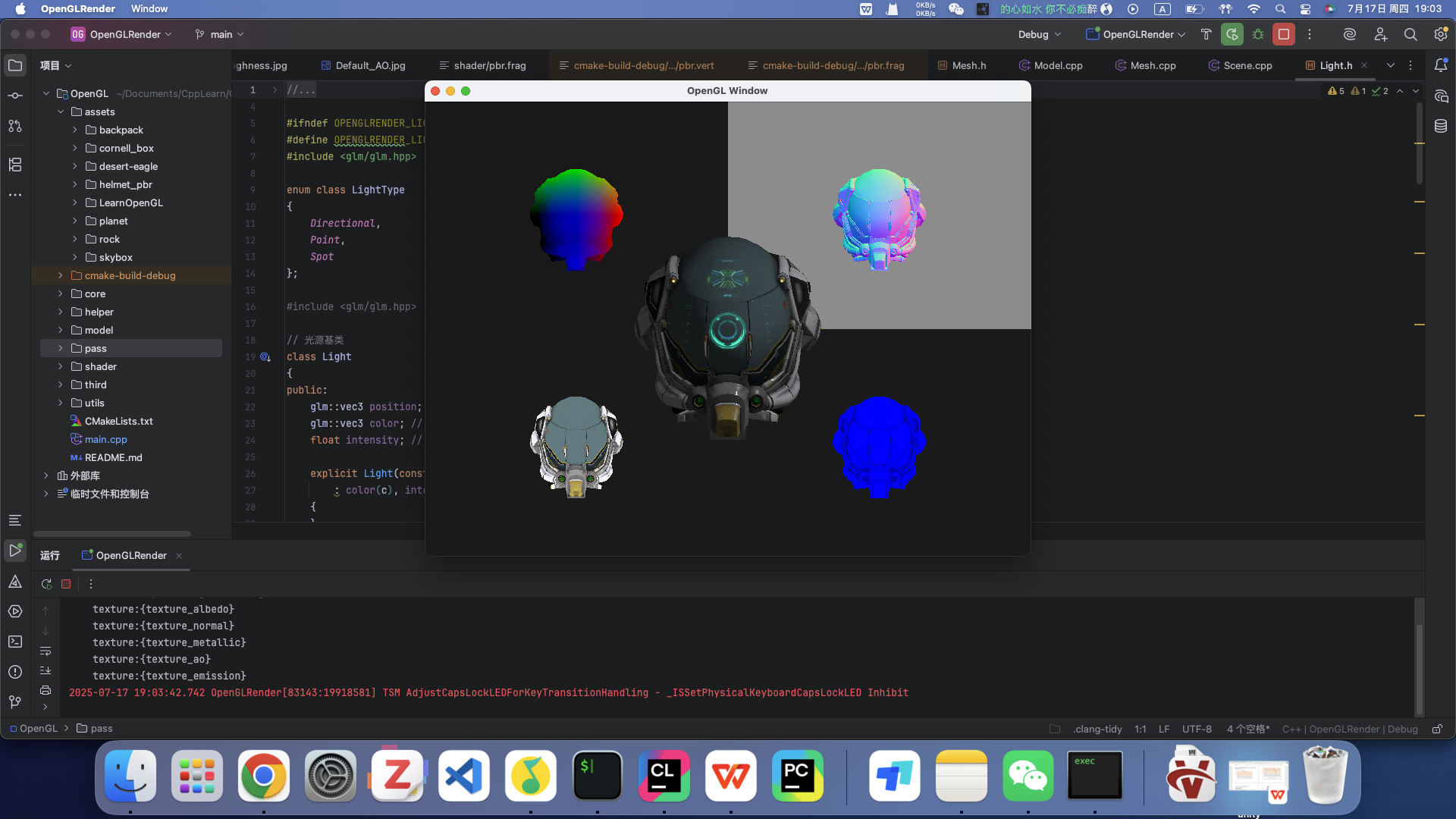
  • 延迟渲染管线
  • G-Buffer的可视化调试
  • PBR材质直接光照渲染 下面开始研究IBL在OpenGL中的实现

理论准备

基于图像的光照(Image based lighting, IBL)将周围环境整体视为一个大光源。IBL 通常使用立方体贴图的每个像素视为光源

在IBL中,不只有直接光照对着色点有贡献,而是四面八方的环境光都有贡献。之前总觉得为什么渲染方程中有积分,为什么在shader中没见积分运算,原来是它只是一个理想状态,要计算所有方向的光照是很困难的,给定任何方向向量 wi,我们需要一些方法来获取这个方向上场景的辐射度,并且需要实时计算积分。可以使用蒙特卡洛采样来近似积分值,但IBL并不是这样。说实话听YLQ讲,越听越是迷糊。

下面看看IBL是如何避免积分运算的

避免积分运算

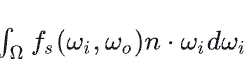
首先渲染方程的形式如下,已经被分成了漫反射和镜面反射两部分 请添加图片描述 进一步把+号拆开,可以拆成两个积分

漫反射部分

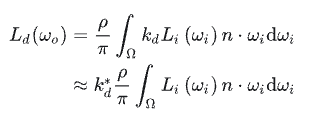
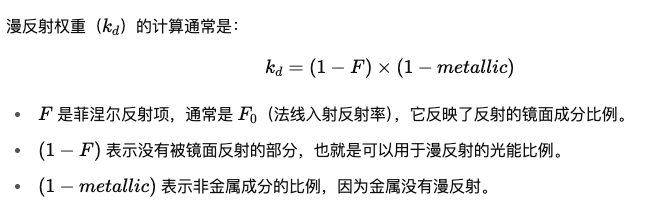
首先来看漫反射部分,这里用的BRDF是Lambertian模型,它是一个常数,所以可以直接提出去,分子代表颜色 请添加图片描述 另外kd的计算,基本原理就是先算出漫反射的比例,再进一步去除金属度的影响(金属没有漫反射),为什么这样设计,我查AI应该是迪士尼的论文提出的。 请添加图片描述 kd与光线方向有关系(因为F的计算需要wi),所以不能移出积分,做一个近似操作,本来F需要wi和半程向量来计算,改为用摄像机观察方向w0和法线方向来近似,这样就可以挪出去了请添加图片描述 其中 请添加图片描述(F0表示垂直入射时的反射率)
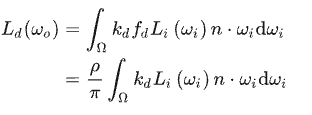

最终

请添加图片描述 积分内部就只有光源和cos了。 到现在对于不同的法线方向n,就可以预计算一个积分值。 也就是说这张贴图存储的是不同法线方向上的积分值 这样分析半天,其实从理论上想,也应该这样,我不管从什么方向上看(即不同的w0,irrandance是方向无关的)当我观察一个点时,环境贴图对他的贡献都是它法线为中心形成的半球上的光对他的贡献之和(因为是漫反射)

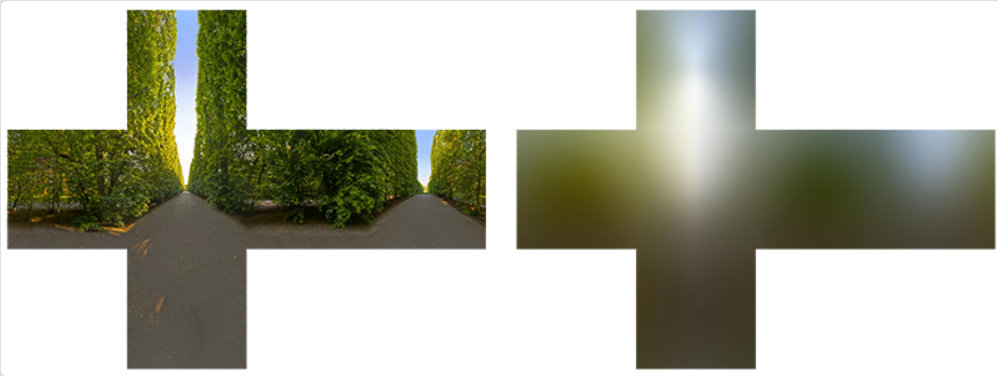
因此我们可以预计算这个积分值,得到一个 cubemap,称为 irradiance map。积分方法就是蒙特卡洛积分,我们可以简单的在半球面上均匀采样。下面给出learnOpenGL的采样方案 首先改为球面坐标系 在这里插入图片描述 用黎曼积分来近似 在这里插入图片描述

在这里插入图片描述 注意 实际场景中 = 多个局部环境(多个“局部场景”) 在全局场景下: 每个区域(Probe volume)都有自己的局部环境 map; 然后通过探针插值(或者 voxel GI)做出空间连续的光照过渡。 比如室内室外的map肯定得不一样才对,即使法线方向一致。 这就是为什么要用探针

镜面反射部分
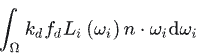
请添加图片描述 这部分比较夸张,与w0、法线方向、以及BRDF中各种参数有关,即使一个方向向量用球面坐标系,也有9个因素。所以不能直接预计算。 首先基本思路是蒙特卡罗积分,但是当前采样方法实时太慢 Epic提出了很好的解决方案:分割求和近似法(split sum approximation)

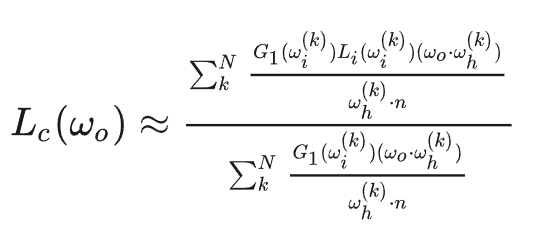
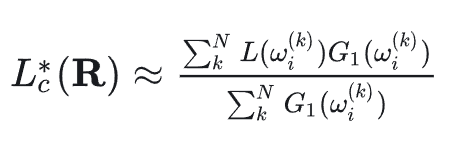
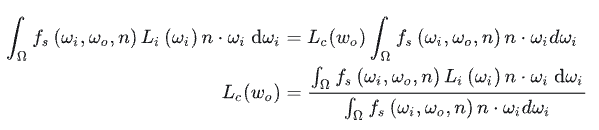
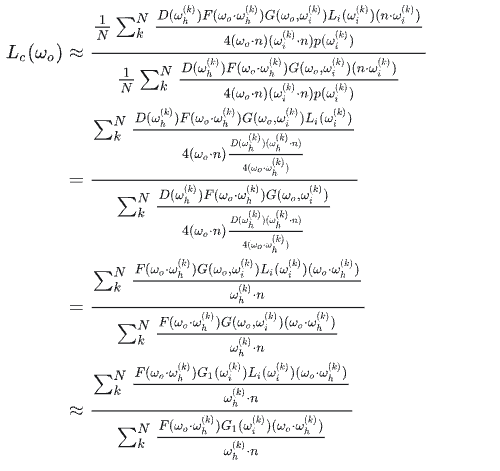
首先思路是把积分中的光照项提出来 请添加图片描述 如果想求解提出来的这一项Lc(wo)是什么,就需要进行蒙特卡洛积分运算,运算通过法线分布函数进行采样化简,化简过程如下(本质是把法线分布函数的PDF求出来带进去,进行分子分母化简,得到最终结果) 请添加图片描述 进一步近似,F对结果影响不大,直接去掉了 在这里插入图片描述 在这里插入图片描述
再近似,把w0和法线方向都近似成R(反射方向),这样预计算就与观察无关了(把摄像机方向、法线方向全部换成反射方向R来计算),这样处理会让掠射角处理出问题 在这里插入图片描述
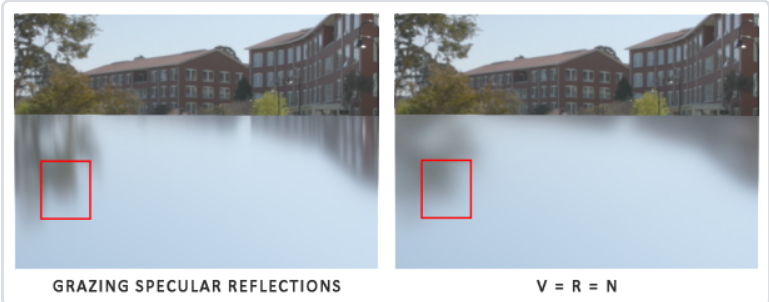
在这里插入图片描述 总结来说就是利用了各种近似手段把这个积分拆成了两部分,第一部分放在坐标,剩余放在右边,通过各种化简近似出第一部分是什么,然后放回原式 第一部分的预计算其实就是在以反射方向为中心,整个半球的光照进行积分的预计算,但是需要通过粗糙度来进行mipmap,因为各种近似的前提是法线分布函数,他是由粗糙度参与控制的,越粗糙的表面,越要用level更高的mipmap 在这里插入图片描述

请添加图片描述

第一部分通过在法线分布函数上进行采样蒙特卡洛积分进行预计算 下面看第二部分 请添加图片描述,他的参数包括w0,n,F0(通过金属度和albedo决定)和粗糙度。 F0是常数,看看怎么挪出去 请添加图片描述 又是一个拆分,把积分拆成两项(这里就是拆加法,没有近似),然后把F0挪出去,得到关于scale和bias两项的计算 这两项用法线分布函数进行蒙特卡洛积分,可以抵消很多项。拆掉F0后,积分结果只和cos和粗糙度了,用一个2D纹理的两个通道存储结果即可。 请添加图片描述 这个预计算部分叫做LUT,这个 LUT 是由 BRDF 决定的,所以确定的 BRDF 就有确定的 LUT。
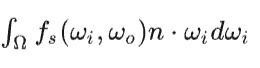
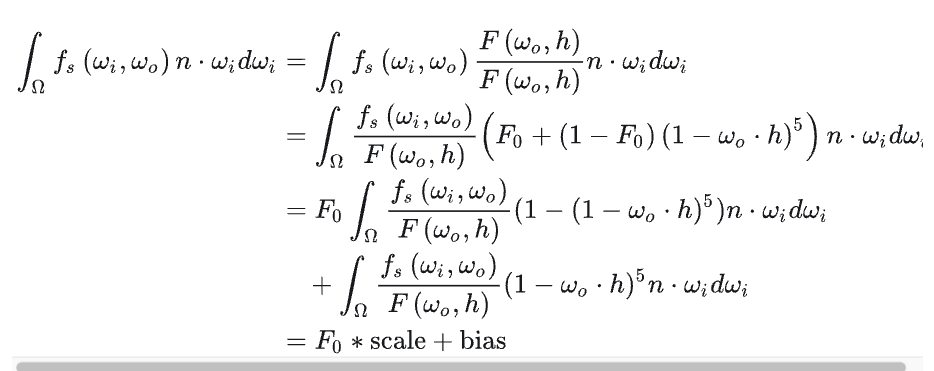
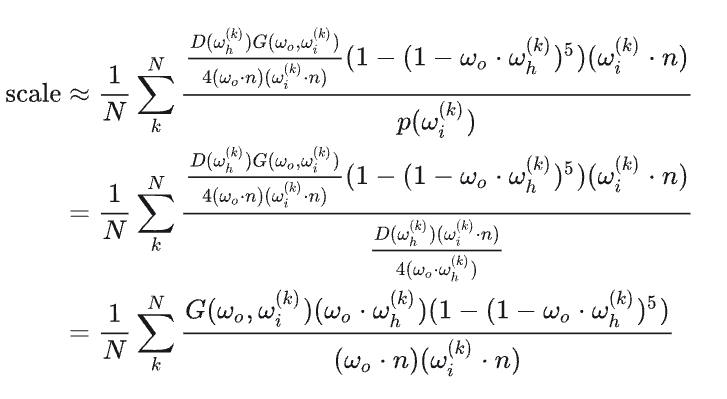
OpenGL实现

HDR与cubemap

在 PBR 渲染管线中考虑高动态范围(High Dynamic Range, HDR)的场景光照非常重要。由于 PBR 的大部分输入基于实际物理属性和测量,因此为入射光值找到其物理等效值是很重要的 第一步:加载HDR图片,存储为纹理

 1
 2
 3
 4
 5
 6
 7
 8
 9
10
11
12
13
14
15
16
17
18
19
20
21
#include "stb_image.h"
stbi_set_flip_vertically_on_load(true);
int width, height, nrComponents;
float *data = stbi_loadf("newport_loft.hdr", &width, &height, &nrComponents, 0);
unsigned int hdrTexture;
if (data)
{
    glGenTextures(1, &hdrTexture);
    glBindTexture(GL_TEXTURE_2D, hdrTexture);
    // 这里必须用32F,有些HDR图片太亮了
    glTexImage2D(GL_TEXTURE_2D, 0, GL_RGB32F, width, height, 0, GL_RGB, GL_FLOAT, data); 
    glTexParameteri(GL_TEXTURE_2D, GL_TEXTURE_WRAP_S, GL_CLAMP_TO_EDGE);
    glTexParameteri(GL_TEXTURE_2D, GL_TEXTURE_WRAP_T, GL_CLAMP_TO_EDGE);
    glTexParameteri(GL_TEXTURE_2D, GL_TEXTURE_MIN_FILTER, GL_LINEAR);
    glTexParameteri(GL_TEXTURE_2D, GL_TEXTURE_MAG_FILTER, GL_LINEAR);
    stbi_image_free(data);
}
else
{
    std::cout << "Failed to load HDR image." << std::endl;
} 

第二步:从纹理到立方体贴图 顶点着色器传递世界坐标

 1
 2
 3
 4
 5
 6
 7
 8
 9
10
11
12
13
#version 330 core
layout (location = 0) in vec3 aPos;

out vec3 localPos;

uniform mat4 projection;
uniform mat4 view;

void main()
{
    localPos = aPos;  
    gl_Position =  projection * view * vec4(localPos, 1.0);
}

片段着色器,在HDR图上进行采样

 1
 2
 3
 4
 5
 6
 7
 8
 9
10
11
12
13
14
15
16
17
18
19
20
21
22
#version 330 core
out vec4 FragColor;
in vec3 localPos;

uniform sampler2D equirectangularMap;

const vec2 invAtan = vec2(0.1591, 0.3183);
vec2 SampleSphericalMap(vec3 v)
{
    vec2 uv = vec2(atan(v.z, v.x), asin(v.y));
    uv *= invAtan;
    uv += 0.5;
    return uv;
}

void main()
{       
    vec2 uv = SampleSphericalMap(normalize(localPos)); // make sure to normalize localPos
    vec3 color = texture(equirectangularMap, uv).rgb;

    FragColor = vec4(color, 1.0);
}

要将等距柱状投影图转换为立方体贴图,我们需要渲染一个(单位)立方体,并从内部将等距柱状图投影到立方体的每个面,先创建一张立方体贴图

 1
 2
 3
 4
 5
 6
 7
 8
 9
10
11
12
13
14
unsigned int envCubemap;
glGenTextures(1, &envCubemap);
glBindTexture(GL_TEXTURE_CUBE_MAP, envCubemap);
for (unsigned int i = 0; i < 6; ++i)
{
    // note that we store each face with 16 bit floating point values
    glTexImage2D(GL_TEXTURE_CUBE_MAP_POSITIVE_X + i, 0, GL_RGB16F, 
                 512, 512, 0, GL_RGB, GL_FLOAT, nullptr);
}
glTexParameteri(GL_TEXTURE_CUBE_MAP, GL_TEXTURE_WRAP_S, GL_CLAMP_TO_EDGE);
glTexParameteri(GL_TEXTURE_CUBE_MAP, GL_TEXTURE_WRAP_T, GL_CLAMP_TO_EDGE);
glTexParameteri(GL_TEXTURE_CUBE_MAP, GL_TEXTURE_WRAP_R, GL_CLAMP_TO_EDGE);
glTexParameteri(GL_TEXTURE_CUBE_MAP, GL_TEXTURE_MIN_FILTER, GL_LINEAR);
glTexParameteri(GL_TEXTURE_CUBE_MAP, GL_TEXTURE_MAG_FILTER, GL_LINEAR);

对同一个立方体渲染六次,每次面对立方体的一个面,并用帧缓冲对象记录其结果

1
2
3
4
5
6
7
8
unsigned int captureFBO, captureRBO;
glGenFramebuffers(1, &captureFBO);
glGenRenderbuffers(1, &captureRBO);

glBindFramebuffer(GL_FRAMEBUFFER, captureFBO);
glBindRenderbuffer(GL_RENDERBUFFER, captureRBO);
glRenderbufferStorage(GL_RENDERBUFFER, GL_DEPTH_COMPONENT24, 512, 512);
glFramebufferRenderbuffer(GL_FRAMEBUFFER, GL_DEPTH_ATTACHMENT, GL_RENDERBUFFER, captureRBO);  

下面正式进入转换

 1
 2
 3
 4
 5
 6
 7
 8
 9
10
11
12
13
14
15
16
17
18
19
20
21
22
23
24
25
26
27
28
29
30
31
32
// 让摄像机对准6个轴方向
glm::mat4 captureProjection = glm::perspective(glm::radians(90.0f), 1.0f, 0.1f, 10.0f);
glm::mat4 captureViews[] = 
{
   glm::lookAt(glm::vec3(0.0f, 0.0f, 0.0f), glm::vec3( 1.0f,  0.0f,  0.0f), glm::vec3(0.0f, -1.0f,  0.0f)),
   glm::lookAt(glm::vec3(0.0f, 0.0f, 0.0f), glm::vec3(-1.0f,  0.0f,  0.0f), glm::vec3(0.0f, -1.0f,  0.0f)),
   glm::lookAt(glm::vec3(0.0f, 0.0f, 0.0f), glm::vec3( 0.0f,  1.0f,  0.0f), glm::vec3(0.0f,  0.0f,  1.0f)),
   glm::lookAt(glm::vec3(0.0f, 0.0f, 0.0f), glm::vec3( 0.0f, -1.0f,  0.0f), glm::vec3(0.0f,  0.0f, -1.0f)),
   glm::lookAt(glm::vec3(0.0f, 0.0f, 0.0f), glm::vec3( 0.0f,  0.0f,  1.0f), glm::vec3(0.0f, -1.0f,  0.0f)),
   glm::lookAt(glm::vec3(0.0f, 0.0f, 0.0f), glm::vec3( 0.0f,  0.0f, -1.0f), glm::vec3(0.0f, -1.0f,  0.0f))
};

// convert HDR equirectangular environment map to cubemap equivalent
equirectangularToCubemapShader.use();
equirectangularToCubemapShader.setInt("equirectangularMap", 0);
equirectangularToCubemapShader.setMat4("projection", captureProjection);
glActiveTexture(GL_TEXTURE0);
glBindTexture(GL_TEXTURE_2D, hdrTexture);

glViewport(0, 0, 512, 512); // don't forget to configure the viewport to the capture dimensions.
glBindFramebuffer(GL_FRAMEBUFFER, captureFBO);
for (unsigned int i = 0; i < 6; ++i)
{
    equirectangularToCubemapShader.setMat4("view", captureViews[i]);
    // 把这 6 次渲染结果写入到立方体贴图的六个面上
    glFramebufferTexture2D(GL_FRAMEBUFFER, GL_COLOR_ATTACHMENT0, 
                           GL_TEXTURE_CUBE_MAP_POSITIVE_X + i, envCubemap, 0);
    glClear(GL_COLOR_BUFFER_BIT | GL_DEPTH_BUFFER_BIT);

    renderCube(); // renders a 1x1 cube
}
glBindFramebuffer(GL_FRAMEBUFFER, 0);  

还可以用这个立方体贴图来渲染天空盒 shader部分

 1
 2
 3
 4
 5
 6
 7
 8
 9
10
11
12
13
14
15
16
17
#version 330 core
layout (location = 0) in vec3 aPos;

uniform mat4 projection;
uniform mat4 view;

out vec3 localPos;

void main()
{
    localPos = aPos;

    mat4 rotView = mat4(mat3(view)); // remove translation from the view matrix
    vec4 clipPos = projection * rotView * vec4(localPos, 1.0);

    gl_Position = clipPos.xyww;
}
 1
 2
 3
 4
 5
 6
 7
 8
 9
10
11
12
13
14
15
16
#version 330 core
out vec4 FragColor;

in vec3 localPos;

uniform samplerCube environmentMap;

void main()
{
    vec3 envColor = texture(environmentMap, localPos).rgb;

    envColor = envColor / (envColor + vec3(1.0));
    envColor = pow(envColor, vec3(1.0/2.2)); 

    FragColor = vec4(envColor, 1.0);
}

代码部分

1
2
3
4
5
6
7
8
9
        // 天空盒
        glDepthFunc(GL_LEQUAL);
        skyboxShader.use();
        skyboxShader.setMat4("projection", scene.camera->getProjectionMatrix());
        skyboxShader.setMat4("view", scene.camera->getViewMatrix());
        glActiveTexture(GL_TEXTURE0);
        glBindTexture(GL_TEXTURE_CUBE_MAP, envCubemap);
        scene.renderCube();
        glDepthFunc(GL_LESS);

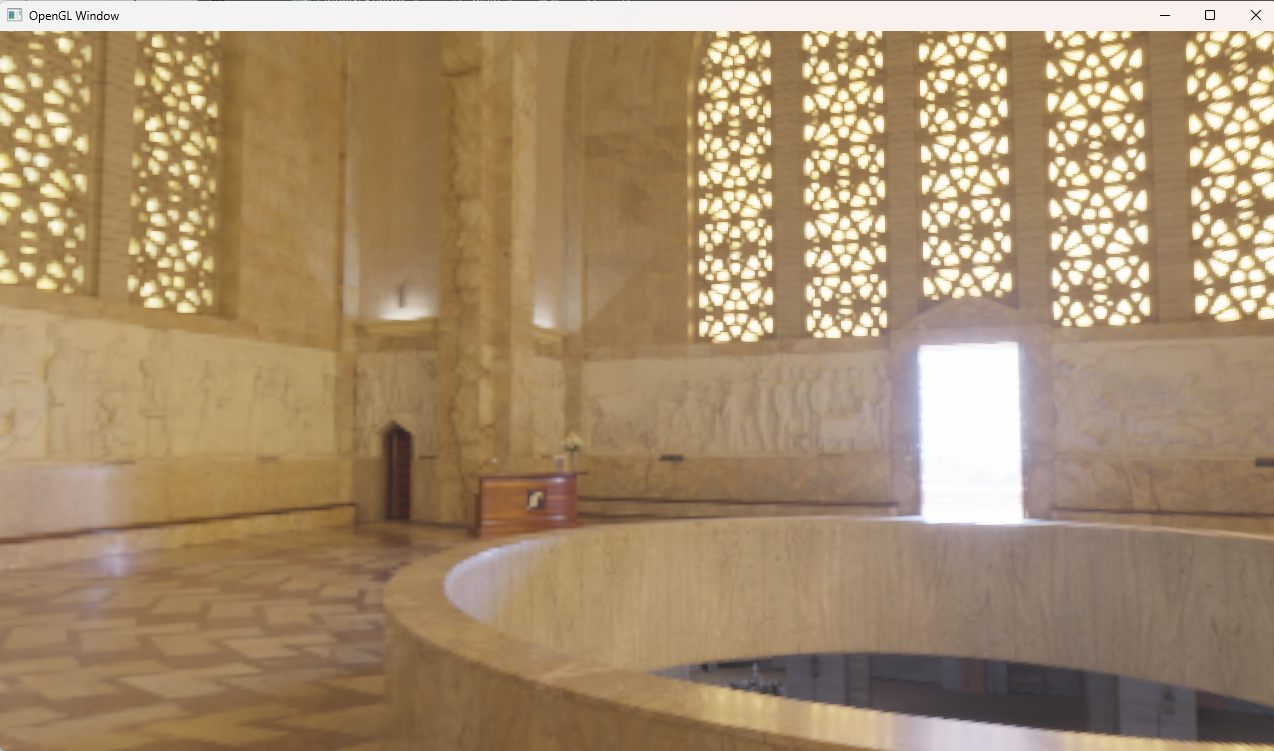
到这里就得到了立方体贴图和天空盒渲染

在这里插入图片描述

irradance Map

预计算对于每个方向来说对半球进行积分的结果,当计算好后,每次需要漫反射,就可以通过法线方向得到漫反射值

1
vec3 irradiance = texture(irradianceMap, N);

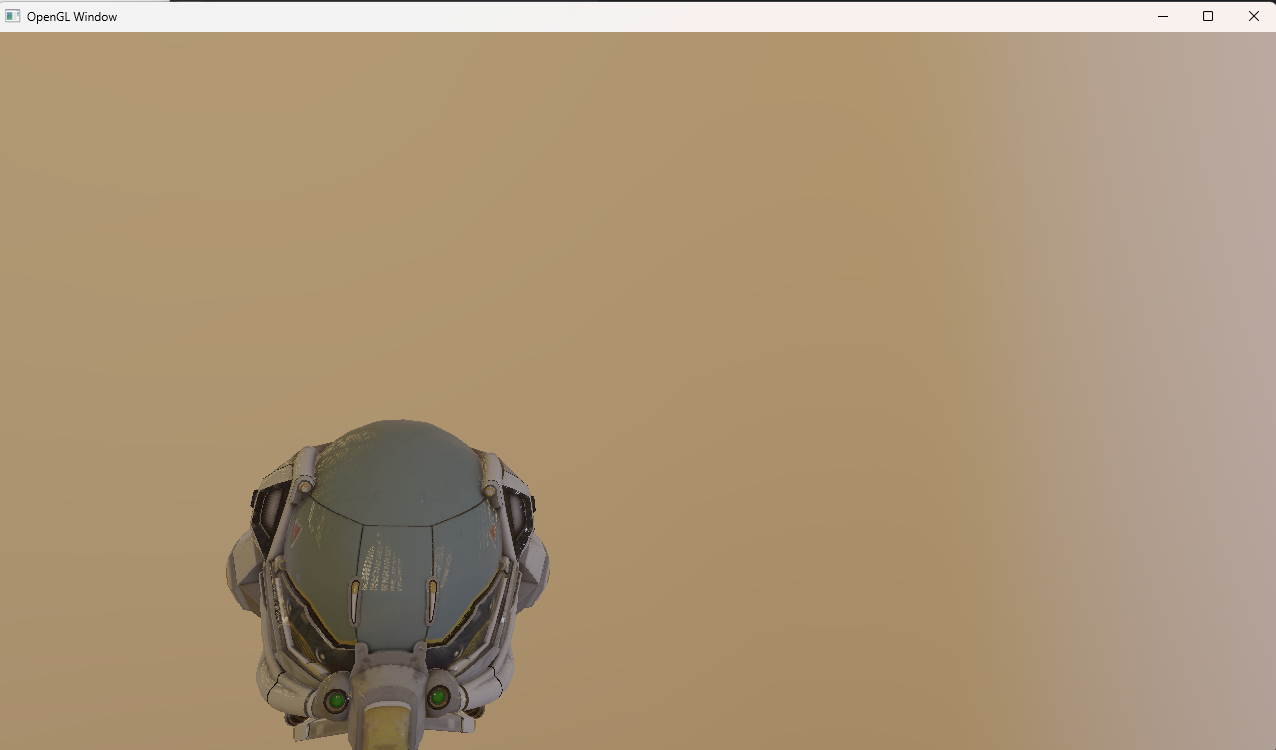
这一步的做法与生成cubemap的做法一致,只是片段着色器不一致。由于辐照度图对所有周围的辐射值取了平均值,因此它丢失了大部分高频细节,所以我们可以以较低的分辨率(32x32)存储,我可以把它渲染成天空盒来看看,基本没有场景信息了,所以不需要高分辨率 在这里插入图片描述
 1
 2
 3
 4
 5
 6
 7
 8
 9
10
11
12
13
14
15
16
17
18
19
20
21
22
23
24
25
26
27
28
29
30
31
32
33
34
35
36
37
38
39
40
41
42
43
44
45
46
47
48
49
50
51
52
53
GLuint preComputer::computeIrradianceMap(GLuint envCubemap)
{
    Shader irradianceMapShader = Shader("shader/irradianceMap.vert","shader/irradianceMap.frag");
    const glm::mat4 captureProjection = glm::perspective(glm::radians(90.0f), 1.0f, 0.1f, 10.0f);
    const glm::mat4 captureViews[] =
    {
        glm::lookAt(glm::vec3(0.0f, 0.0f, 0.0f), glm::vec3(1.0f,  0.0f,  0.0f), glm::vec3(0.0f, -1.0f,  0.0f)),
        glm::lookAt(glm::vec3(0.0f, 0.0f, 0.0f), glm::vec3(-1.0f,  0.0f,  0.0f), glm::vec3(0.0f, -1.0f,  0.0f)),
        glm::lookAt(glm::vec3(0.0f, 0.0f, 0.0f), glm::vec3(0.0f,  1.0f,  0.0f), glm::vec3(0.0f,  0.0f,  1.0f)),
        glm::lookAt(glm::vec3(0.0f, 0.0f, 0.0f), glm::vec3(0.0f, -1.0f,  0.0f), glm::vec3(0.0f,  0.0f, -1.0f)),
        glm::lookAt(glm::vec3(0.0f, 0.0f, 0.0f), glm::vec3(0.0f,  0.0f,  1.0f), glm::vec3(0.0f, -1.0f,  0.0f)),
        glm::lookAt(glm::vec3(0.0f, 0.0f, 0.0f), glm::vec3(0.0f,  0.0f, -1.0f), glm::vec3(0.0f, -1.0f,  0.0f))
    };
    GLuint FrameBuffer;
    GLuint RenderBuffer;
    glGenFramebuffers(1, &FrameBuffer);
    glGenRenderbuffers(1, &RenderBuffer);
    unsigned int irradianceMap;
    glGenTextures(1, &irradianceMap);
    glBindTexture(GL_TEXTURE_CUBE_MAP, irradianceMap);
    for (unsigned int i = 0; i < 6; ++i)
    {
        glTexImage2D(GL_TEXTURE_CUBE_MAP_POSITIVE_X + i, 0, GL_RGB16F, 32, 32, 0,
                     GL_RGB, GL_FLOAT, nullptr);
    }
    glTexParameteri(GL_TEXTURE_CUBE_MAP, GL_TEXTURE_WRAP_S, GL_CLAMP_TO_EDGE);
    glTexParameteri(GL_TEXTURE_CUBE_MAP, GL_TEXTURE_WRAP_T, GL_CLAMP_TO_EDGE);
    glTexParameteri(GL_TEXTURE_CUBE_MAP, GL_TEXTURE_WRAP_R, GL_CLAMP_TO_EDGE);
    glTexParameteri(GL_TEXTURE_CUBE_MAP, GL_TEXTURE_MIN_FILTER, GL_LINEAR);
    glTexParameteri(GL_TEXTURE_CUBE_MAP, GL_TEXTURE_MAG_FILTER, GL_LINEAR);

    glBindFramebuffer(GL_FRAMEBUFFER, FrameBuffer);
    glBindRenderbuffer(GL_RENDERBUFFER, RenderBuffer);
    glRenderbufferStorage(GL_RENDERBUFFER, GL_DEPTH_COMPONENT24, 32, 32);
    irradianceMapShader.use();
    irradianceMapShader.setInt("environmentMap", 0);
    irradianceMapShader.setMat4("projection", captureProjection);
    glActiveTexture(GL_TEXTURE0);
    glBindTexture(GL_TEXTURE_CUBE_MAP, envCubemap);

    glViewport(0, 0, 32, 32); // don't forget to configure the viewport to the capture dimensions.
    glBindFramebuffer(GL_FRAMEBUFFER, FrameBuffer);
    for (unsigned int i = 0; i < 6; ++i)
    {
        irradianceMapShader.setMat4("view", captureViews[i]);
        glFramebufferTexture2D(GL_FRAMEBUFFER, GL_COLOR_ATTACHMENT0,
                               GL_TEXTURE_CUBE_MAP_POSITIVE_X + i, irradianceMap, 0);
        glClear(GL_COLOR_BUFFER_BIT | GL_DEPTH_BUFFER_BIT);

        scene.renderCube();
    }
    glBindFramebuffer(GL_FRAMEBUFFER, 0);
}

具体的shader

 1
 2
 3
 4
 5
 6
 7
 8
 9
10
11
12
13
#version 330 core
layout (location = 0) in vec3 aPos;

out vec3 WorldPos;

uniform mat4 projection;
uniform mat4 view;

void main()
{
    WorldPos = aPos;
    gl_Position =  projection * view * vec4(WorldPos, 1.0);
}
 1
 2
 3
 4
 5
 6
 7
 8
 9
10
11
12
13
14
15
16
17
18
19
20
21
22
23
24
25
26
27
28
29
30
31
32
33
34
35
36
37
38
#version 330 core
out vec4 FragColor;
in vec3 WorldPos;

uniform samplerCube environmentMap;

const float PI = 3.14159265359;

void main()
{
    vec3 N = normalize(WorldPos);

    vec3 irradiance = vec3(0.0);

    // tangent space calculation from origin point
    vec3 up    = vec3(0.0, 1.0, 0.0);
    vec3 right = normalize(cross(up, N));
    up         = normalize(cross(N, right));

    float sampleDelta = 0.025;
    float nrSamples = 0.0;
    for(float phi = 0.0; phi < 2.0 * PI; phi += sampleDelta)
    {
        for(float theta = 0.0; theta < 0.5 * PI; theta += sampleDelta)
        {
            // spherical to cartesian (in tangent space)
            vec3 tangentSample = vec3(sin(theta) * cos(phi),  sin(theta) * sin(phi), cos(theta));
            // tangent space to world
            vec3 sampleVec = tangentSample.x * right + tangentSample.y * up + tangentSample.z * N;

            irradiance += texture(environmentMap, sampleVec).rgb * cos(theta) * sin(theta);
            nrSamples++;
        }
    }
    irradiance = PI * irradiance * (1.0 / float(nrSamples));

    FragColor = vec4(irradiance, 1.0);
}

prefilterMap

先创建一张cubemap

 1
 2
 3
 4
 5
 6
 7
 8
 9
10
11
12
13
14
unsigned int prefilterMap;
glGenTextures(1, &prefilterMap);
glBindTexture(GL_TEXTURE_CUBE_MAP, prefilterMap);
for (unsigned int i = 0; i < 6; ++i)
{
    glTexImage2D(GL_TEXTURE_CUBE_MAP_POSITIVE_X + i, 0, GL_RGB16F, 128, 128, 0, GL_RGB, GL_FLOAT, nullptr);
}
glTexParameteri(GL_TEXTURE_CUBE_MAP, GL_TEXTURE_WRAP_S, GL_CLAMP_TO_EDGE);
glTexParameteri(GL_TEXTURE_CUBE_MAP, GL_TEXTURE_WRAP_T, GL_CLAMP_TO_EDGE);
glTexParameteri(GL_TEXTURE_CUBE_MAP, GL_TEXTURE_WRAP_R, GL_CLAMP_TO_EDGE);
glTexParameteri(GL_TEXTURE_CUBE_MAP, GL_TEXTURE_MIN_FILTER, GL_LINEAR_MIPMAP_LINEAR); 
glTexParameteri(GL_TEXTURE_CUBE_MAP, GL_TEXTURE_MAG_FILTER, GL_LINEAR);

glGenerateMipmap(GL_TEXTURE_CUBE_MAP);

需要的shader,渲染了5层的mipmap,使用法线分布函数进行重要性采样,预计算每个方向上的积分值

  1
  2
  3
  4
  5
  6
  7
  8
  9
 10
 11
 12
 13
 14
 15
 16
 17
 18
 19
 20
 21
 22
 23
 24
 25
 26
 27
 28
 29
 30
 31
 32
 33
 34
 35
 36
 37
 38
 39
 40
 41
 42
 43
 44
 45
 46
 47
 48
 49
 50
 51
 52
 53
 54
 55
 56
 57
 58
 59
 60
 61
 62
 63
 64
 65
 66
 67
 68
 69
 70
 71
 72
 73
 74
 75
 76
 77
 78
 79
 80
 81
 82
 83
 84
 85
 86
 87
 88
 89
 90
 91
 92
 93
 94
 95
 96
 97
 98
 99
100
101
102
103
104
105
106
107
108
109
110
#version 330 core
out vec4 FragColor;
in vec3 WorldPos;

uniform samplerCube environmentMap;
// 当前贴图的粗糙度
uniform float roughness;

const float PI = 3.14159265359;
// ----------------------------------------------------------------------------
float DistributionGGX(vec3 N, vec3 H, float roughness)
{
    float a = roughness*roughness;
    float a2 = a*a;
    float NdotH = max(dot(N, H), 0.0);
    float NdotH2 = NdotH*NdotH;

    float nom   = a2;
    float denom = (NdotH2 * (a2 - 1.0) + 1.0);
    denom = PI * denom * denom;

    return nom / denom;
}
// ----------------------------------------------------------------------------
// http://holger.dammertz.org/stuff/notes_HammersleyOnHemisphere.html
// efficient VanDerCorpus calculation.

float RadicalInverse_VdC(uint bits)
{
    bits = (bits << 16u) | (bits >> 16u);
    bits = ((bits & 0x55555555u) << 1u) | ((bits & 0xAAAAAAAAu) >> 1u);
    bits = ((bits & 0x33333333u) << 2u) | ((bits & 0xCCCCCCCCu) >> 2u);
    bits = ((bits & 0x0F0F0F0Fu) << 4u) | ((bits & 0xF0F0F0F0u) >> 4u);
    bits = ((bits & 0x00FF00FFu) << 8u) | ((bits & 0xFF00FF00u) >> 8u);
    return float(bits) * 2.3283064365386963e-10; // / 0x100000000
}
// 低差异序列
vec2 Hammersley(uint i, uint N)
{
    return vec2(float(i)/float(N), RadicalInverse_VdC(i));
}
// ----------------------------------------------------------------------------
// GGX法线分布函数下的重要性采样
vec3 ImportanceSampleGGX(vec2 Xi, vec3 N, float roughness)
{
    float a = roughness*roughness;

    float phi = 2.0 * PI * Xi.x;
    float cosTheta = sqrt((1.0 - Xi.y) / (1.0 + (a*a - 1.0) * Xi.y));
    float sinTheta = sqrt(1.0 - cosTheta*cosTheta);

    // from spherical coordinates to cartesian coordinates - halfway vector
    vec3 H;
    H.x = cos(phi) * sinTheta;
    H.y = sin(phi) * sinTheta;
    H.z = cosTheta;

    // from tangent-space H vector to world-space sample vector
    vec3 up          = abs(N.z) < 0.999 ? vec3(0.0, 0.0, 1.0) : vec3(1.0, 0.0, 0.0);
    vec3 tangent   = normalize(cross(up, N));
    vec3 bitangent = cross(N, tangent);

    vec3 sampleVec = tangent * H.x + bitangent * H.y + N * H.z;
    return normalize(sampleVec);
}
// ----------------------------------------------------------------------------
void main()
{
    vec3 N = normalize(WorldPos);  // 以像素位置为法线方向(其实是在做 cube map 采样方向)

    vec3 R = N; // 反射向量设为法线
    vec3 V = R; // 视线向量也设为法线(这是预计算贴图,所以默认观察方向和反射方向一致)

    const uint SAMPLE_COUNT = 1024u; // importance sample 的数量
    vec3 prefilteredColor = vec3(0.0);
    float totalWeight = 0.0;

    for(uint i = 0u; i < SAMPLE_COUNT; ++i)
    {
        vec2 Xi = Hammersley(i, SAMPLE_COUNT);           // 第 i 个低差异采样点
        vec3 H = ImportanceSampleGGX(Xi, N, roughness);  // 半程向量 H
        vec3 L  = normalize(2.0 * dot(V, H) * H - V);     // 入射光方向 L = reflect(-V, H)

        float NdotL = max(dot(N, L), 0.0);
        if(NdotL > 0.0)
        {
            // 计算重要性采样的 pdf
            float D = DistributionGGX(N, H, roughness);
            float NdotH = max(dot(N, H), 0.0);
            float HdotV = max(dot(H, V), 0.0);
            float pdf = D * NdotH / (4.0 * HdotV) + 0.0001;

            // 环境贴图的信息
            float resolution = 512.0; // 原始 cube map 每个面宽度
            float saTexel  = 4.0 * PI / (6.0 * resolution * resolution); // 每个 texel 的立体角大小
            float saSample = 1.0 / (float(SAMPLE_COUNT) * pdf + 0.0001); // 当前 sample 对应的立体角

            // 根据 sample 的“模糊度”选择 mipmap 层级
            float mipLevel = roughness == 0.0 ? 0.0 : 0.5 * log2(saSample / saTexel);

            // 对 cube map 进行 LOD 采样(选定 mip level)
            prefilteredColor += textureLod(environmentMap, L, mipLevel).rgb * NdotL;
            totalWeight += NdotL;
        }
    }

    prefilteredColor = prefilteredColor / totalWeight; // 归一化亮度

    FragColor = vec4(prefilteredColor, 1.0); // 输出颜色
}

渲染代码

 1
 2
 3
 4
 5
 6
 7
 8
 9
10
11
12
13
14
15
16
17
18
19
20
21
22
23
24
25
26
27
28
29
30
31
32
33
34
35
36
37
38
39
40
41
42
43
44
45
46
47
48
49
50
51
52
53
54
55
56
57
58
59
60
61
62
63
64
65
66
67
68
GLuint preComputer::computePrefilterMap(GLuint envCubemap)
{
    const glm::mat4 captureProjection = glm::perspective(glm::radians(90.0f), 1.0f, 0.1f, 10.0f);
    const glm::mat4 captureViews[] =
    {
        glm::lookAt(glm::vec3(0.0f, 0.0f, 0.0f), glm::vec3(1.0f,  0.0f,  0.0f), glm::vec3(0.0f, -1.0f,  0.0f)),
        glm::lookAt(glm::vec3(0.0f, 0.0f, 0.0f), glm::vec3(-1.0f,  0.0f,  0.0f), glm::vec3(0.0f, -1.0f,  0.0f)),
        glm::lookAt(glm::vec3(0.0f, 0.0f, 0.0f), glm::vec3(0.0f,  1.0f,  0.0f), glm::vec3(0.0f,  0.0f,  1.0f)),
        glm::lookAt(glm::vec3(0.0f, 0.0f, 0.0f), glm::vec3(0.0f, -1.0f,  0.0f), glm::vec3(0.0f,  0.0f, -1.0f)),
        glm::lookAt(glm::vec3(0.0f, 0.0f, 0.0f), glm::vec3(0.0f,  0.0f,  1.0f), glm::vec3(0.0f, -1.0f,  0.0f)),
        glm::lookAt(glm::vec3(0.0f, 0.0f, 0.0f), glm::vec3(0.0f,  0.0f, -1.0f), glm::vec3(0.0f, -1.0f,  0.0f))
    };
    glEnable(GL_TEXTURE_CUBE_MAP_SEAMLESS);
    Shader prefilterShader = Shader("shader/prefiltermap.vert","shader/prefiltermap.frag");

    GLuint FrameBuffer;
    GLuint RenderBuffer;
    glGenFramebuffers(1, &FrameBuffer);
    glGenRenderbuffers(1, &RenderBuffer);
    unsigned int prefilterMap;
    glGenTextures(1, &prefilterMap);
    glBindTexture(GL_TEXTURE_CUBE_MAP, prefilterMap);
    for (unsigned int i = 0; i < 6; ++i)
    {
        glTexImage2D(GL_TEXTURE_CUBE_MAP_POSITIVE_X + i, 0, GL_RGB16F, 128, 128, 0, GL_RGB, GL_FLOAT, nullptr);
    }
    glTexParameteri(GL_TEXTURE_CUBE_MAP, GL_TEXTURE_WRAP_S, GL_CLAMP_TO_EDGE);
    glTexParameteri(GL_TEXTURE_CUBE_MAP, GL_TEXTURE_WRAP_T, GL_CLAMP_TO_EDGE);
    glTexParameteri(GL_TEXTURE_CUBE_MAP, GL_TEXTURE_WRAP_R, GL_CLAMP_TO_EDGE);
    glTexParameteri(GL_TEXTURE_CUBE_MAP, GL_TEXTURE_MIN_FILTER, GL_LINEAR_MIPMAP_LINEAR);
    glTexParameteri(GL_TEXTURE_CUBE_MAP, GL_TEXTURE_MAG_FILTER, GL_LINEAR);

    glGenerateMipmap(GL_TEXTURE_CUBE_MAP);

    prefilterShader.use();
    prefilterShader.setInt("environmentMap", 0);
    prefilterShader.setMat4("projection", captureProjection);
    glActiveTexture(GL_TEXTURE0);
    glBindTexture(GL_TEXTURE_CUBE_MAP, envCubemap);

    glBindFramebuffer(GL_FRAMEBUFFER, FrameBuffer);

    unsigned int maxMipLevels = 5;
    // 单独生成5张map,对应不同的粗糙度,来组成mipmap
    for (unsigned int mip = 0; mip < maxMipLevels; ++mip)
    {
        // reisze framebuffer according to mip-level size.
        unsigned int mipWidth  = 128 * std::pow(0.5, mip);
        unsigned int mipHeight = 128 * std::pow(0.5, mip);
        glBindRenderbuffer(GL_RENDERBUFFER, RenderBuffer);
        glRenderbufferStorage(GL_RENDERBUFFER, GL_DEPTH_COMPONENT24, mipWidth, mipHeight);
        glViewport(0, 0, mipWidth, mipHeight);

        float roughness = (float)mip / (float)(maxMipLevels - 1);
        prefilterShader.setFloat("roughness", roughness);
        for (unsigned int i = 0; i < 6; ++i)
        {
            prefilterShader.setMat4("view", captureViews[i]);
            glFramebufferTexture2D(GL_FRAMEBUFFER, GL_COLOR_ATTACHMENT0,
                                   GL_TEXTURE_CUBE_MAP_POSITIVE_X + i, prefilterMap, mip);

            glClear(GL_COLOR_BUFFER_BIT | GL_DEPTH_BUFFER_BIT);
            scene.renderCube();
        }
    }
    glBindFramebuffer(GL_FRAMEBUFFER, 0);
    return prefilterMap;
}

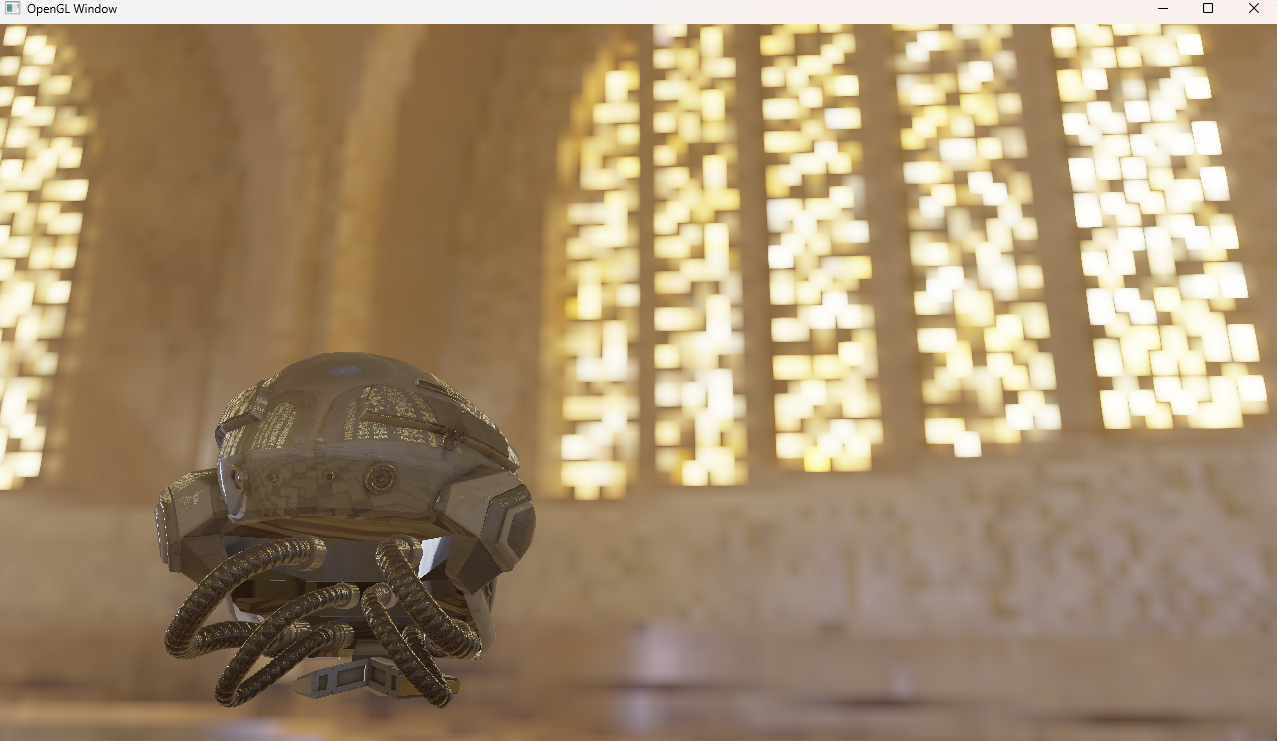
用prefilterMap渲染天空盒的结果 在这里插入图片描述

LUT

现在渲染方程就剩最后一部分积分的预计算了 在这里插入图片描述 通过一系列变换变成了 在这里插入图片描述 这个式子只和观察方向与法线的夹角以及粗糙都有关,所以用一张2D贴图存储,采样计算积分仍然使用GGX重要性采样

 1
 2
 3
 4
 5
 6
 7
 8
 9
10
11
12
13
14
15
16
17
18
19
20
21
22
23
24
25
26
27
28
29
30
31
32
33
34
35
36
37
38
39
40
41
42
43
vec2 IntegrateBRDF(float NdotV, float roughness)
{
    vec3 V;
    V.x = sqrt(1.0 - NdotV*NdotV);
    V.y = 0.0;
    V.z = NdotV;

    float A = 0.0;
    float B = 0.0;

    vec3 N = vec3(0.0, 0.0, 1.0);

    const uint SAMPLE_COUNT = 1024u;
    for(uint i = 0u; i < SAMPLE_COUNT; ++i)
    {
        vec2 Xi = Hammersley(i, SAMPLE_COUNT);
        vec3 H  = ImportanceSampleGGX(Xi, N, roughness);
        vec3 L  = normalize(2.0 * dot(V, H) * H - V);

        float NdotL = max(L.z, 0.0);
        float NdotH = max(H.z, 0.0);
        float VdotH = max(dot(V, H), 0.0);

        if(NdotL > 0.0)
        {
            float G = GeometrySmith(N, V, L, roughness);
            float G_Vis = (G * VdotH) / (NdotH * NdotV);
            float Fc = pow(1.0 - VdotH, 5.0);

            A += (1.0 - Fc) * G_Vis;
            B += Fc * G_Vis;
        }
    }
    A /= float(SAMPLE_COUNT);
    B /= float(SAMPLE_COUNT);
    return vec2(A, B);
}
// ----------------------------------------------------------------------------
void main() 
{
    vec2 integratedBRDF = IntegrateBRDF(TexCoords.x, TexCoords.y);
    FragColor = integratedBRDF;
}
 1
 2
 3
 4
 5
 6
 7
 8
 9
10
11
12
13
14
15
16
17
18
19
20
21
22
23
24
25
26
27
28
29
30
GLuint preComputer::computeLutMap(GLuint envCubemap)
{
    Shader lutShader = Shader("shader/lut.vert","shader/lut.frag");

    GLuint brdfLUTTexture;
    glGenTextures(1, &brdfLUTTexture);
    GLuint FrameBuffer;
    GLuint RenderBuffer;
    glGenFramebuffers(1, &FrameBuffer);
    glGenRenderbuffers(1, &RenderBuffer);
    // pre-allocate enough memory for the LUT texture.
    glBindTexture(GL_TEXTURE_2D, brdfLUTTexture);
    glTexImage2D(GL_TEXTURE_2D, 0, GL_RG16F, 512, 512, 0, GL_RG, GL_FLOAT, 0);
    glTexParameteri(GL_TEXTURE_2D, GL_TEXTURE_WRAP_S, GL_CLAMP_TO_EDGE);
    glTexParameteri(GL_TEXTURE_2D, GL_TEXTURE_WRAP_T, GL_CLAMP_TO_EDGE);
    glTexParameteri(GL_TEXTURE_2D, GL_TEXTURE_MIN_FILTER, GL_LINEAR);
    glTexParameteri(GL_TEXTURE_2D, GL_TEXTURE_MAG_FILTER, GL_LINEAR);
    glBindFramebuffer(GL_FRAMEBUFFER, FrameBuffer);
    glBindRenderbuffer(GL_RENDERBUFFER, RenderBuffer);
    glRenderbufferStorage(GL_RENDERBUFFER, GL_DEPTH_COMPONENT24, 512, 512);
    glFramebufferTexture2D(GL_FRAMEBUFFER, GL_COLOR_ATTACHMENT0, GL_TEXTURE_2D, brdfLUTTexture, 0);

    glViewport(0, 0, 512, 512);
    lutShader.use();
    glClear(GL_COLOR_BUFFER_BIT | GL_DEPTH_BUFFER_BIT);
    scene.renderQuad();

    glBindFramebuffer(GL_FRAMEBUFFER, 0);
    return brdfLUTTexture;
}

整合

到这里就以及有了所有预计算贴图,下面就是把这些贴图整合到PBR渲染管线,下面给出一个支持一个光源的IBL+PBR渲染Shader

  1
  2
  3
  4
  5
  6
  7
  8
  9
 10
 11
 12
 13
 14
 15
 16
 17
 18
 19
 20
 21
 22
 23
 24
 25
 26
 27
 28
 29
 30
 31
 32
 33
 34
 35
 36
 37
 38
 39
 40
 41
 42
 43
 44
 45
 46
 47
 48
 49
 50
 51
 52
 53
 54
 55
 56
 57
 58
 59
 60
 61
 62
 63
 64
 65
 66
 67
 68
 69
 70
 71
 72
 73
 74
 75
 76
 77
 78
 79
 80
 81
 82
 83
 84
 85
 86
 87
 88
 89
 90
 91
 92
 93
 94
 95
 96
 97
 98
 99
100
101
102
103
104
105
106
107
108
109
110
111
112
113
114
115
116
117
118
119
120
121
122
123
124
125
126
127
128
129
130
131
132
133
134
135
136
137
138
139
140
141
142
143
144
145
#version 330 core
out vec4 FragColor;

in vec3 T;
in vec3 B;
in vec3 N;


in vec3 WorldPos;
in vec2 TexCoords;


uniform vec3 camPos;
uniform vec3 lightPos;
uniform vec3 lightColor;

// IBL
uniform samplerCube irradianceMap;
uniform samplerCube prefilterMap;
uniform sampler2D lutMap;

// Material maps
uniform sampler2D texture_albedo;
uniform sampler2D texture_normal;
uniform sampler2D texture_metallic;
uniform sampler2D texture_roughness;
uniform sampler2D texture_ao;
uniform sampler2D texture_emission;
// material parameters
//uniform vec3 albedo;
//uniform float metallic;
//uniform float roughness;
//uniform float ao;
const float PI = 3.14159265359;

// Convert normal map to world space
vec3 getNormalFromMap()
{
    vec3 n = normalize(N);
    vec3 t = normalize(T - dot(T, n) * n);
    vec3 b = normalize(cross(n, t));

    mat3 TBN = mat3(t, b, n);
    vec3 normalTS = texture(texture_normal, TexCoords).rgb;
    normalTS = normalTS * 2.0 - 1.0;
    return normalize(TBN * normalTS);
}

// GGX NDF
float DistributionGGX(vec3 N, vec3 H, float roughness)
{
    float a = roughness*roughness;
    float a2 = a*a;
    float NdotH = max(dot(N, H), 0.0);
    float NdotH2 = NdotH*NdotH;

    float nom   = a2;
    float denom = (NdotH2 * (a2 - 1.0) + 1.0);
    denom = PI * denom * denom;

    return nom / denom;
}

// Geometry: Schlick-GGX
float GeometrySchlickGGX(float NdotV, float roughness)
{
    float r = (roughness + 1.0);
    float k = (r*r) / 8.0;

    float nom   = NdotV;
    float denom = NdotV * (1.0 - k) + k;

    return nom / denom;
}

float GeometrySmith(vec3 N, vec3 V, vec3 L, float roughness)
{
    float NdotV = max(dot(N, V), 0.0);
    float NdotL = max(dot(N, L), 0.0);
    float ggx2 = GeometrySchlickGGX(NdotV, roughness);
    float ggx1 = GeometrySchlickGGX(NdotL, roughness);

    return ggx1 * ggx2;
}

// Fresnel: Schlick Approximation
vec3 fresnelSchlick(float cosTheta, vec3 F0)
{
    return F0 + (1.0 - F0) * pow(clamp(1.0 - cosTheta, 0.0, 1.0), 5.0);
}
vec3 fresnelSchlickRoughness(float cosTheta, vec3 F0, float roughness)
{
    return F0 + (max(vec3(1.0 - roughness), F0) - F0) * pow(clamp(1.0 - cosTheta, 0.0, 1.0), 5.0);
}
void main()
{
    // 纹理采样
    vec3 albedo     = pow(texture(texture_albedo, TexCoords).rgb, vec3(2.2));
    float metallic  = texture(texture_metallic, TexCoords).r;
    float roughness = texture(texture_roughness, TexCoords).r;
    float ao        = texture(texture_ao, TexCoords).r;
    vec3 emission     = pow(texture(texture_emission, TexCoords).rgb, vec3(2.2)); // gamma correct
//    vec3 emission = vec3(0,0,0);

    // 参数准备
    vec3 N = getNormalFromMap();   // 法线
    vec3 V = normalize(camPos - WorldPos); // 视线方向
    vec3 R = reflect(-V, N); // 反射方向
    vec3 F0 = mix(vec3(0.04), albedo, metallic); // 菲涅尔反射 F0
    vec3 L = normalize(lightPos - WorldPos); // 光源方向
    vec3 H = normalize(V + L); // 半程向量

    // 光照部分
    float NDF = DistributionGGX(N, H, roughness);
    float G   = GeometrySmith(N, V, L, roughness);
    vec3  F   = fresnelSchlick(max(dot(H, V), 0.0), F0);
    vec3 nominator = NDF * G * F;
    float denominator = 4.0 * max(dot(N, V), 0.0) * max(dot(N, L), 0.0) + 0.001;
    vec3 specular = nominator / denominator;
    vec3 kS = F;
    vec3 kD = (1.0 - kS) * (1.0 - metallic);
    float NdotL = max(dot(N, L), 0.0);
    vec3 radiance = lightColor;
    vec3 Lo = (kD * albedo / PI + specular) * radiance * NdotL;


    // IBL ambient
    const float MAX_REFLECTION_LOD = 4.0;
    vec3 prefilteredColor = textureLod(prefilterMap, R,  roughness * MAX_REFLECTION_LOD).rgb;
    F        = fresnelSchlickRoughness(max(dot(N, V), 0.0), F0, roughness);
    vec2 lut = texture(lutMap, vec2(max(dot(N, V), 0.0), roughness)).rg;
    vec3 specularIBL = prefilteredColor * (F * lut.x + lut.y);
    vec3 irradiance = texture(irradianceMap, N).rgb;
    vec3 diffuse    = irradiance * albedo / PI;  // learnOpenGL中并没有 /PI,实践下来除以效果更好
    vec3 ambient = (kD * diffuse + specularIBL) * ao;


    // 光照相加
    vec3 color = ambient + Lo + emission;
    // toneMapping
    color = color / (color + vec3(1.0));
    // 伽马矫正
    color = pow(color, vec3(1.0 / 2.2));
    FragColor = vec4(color, 1.0);
}

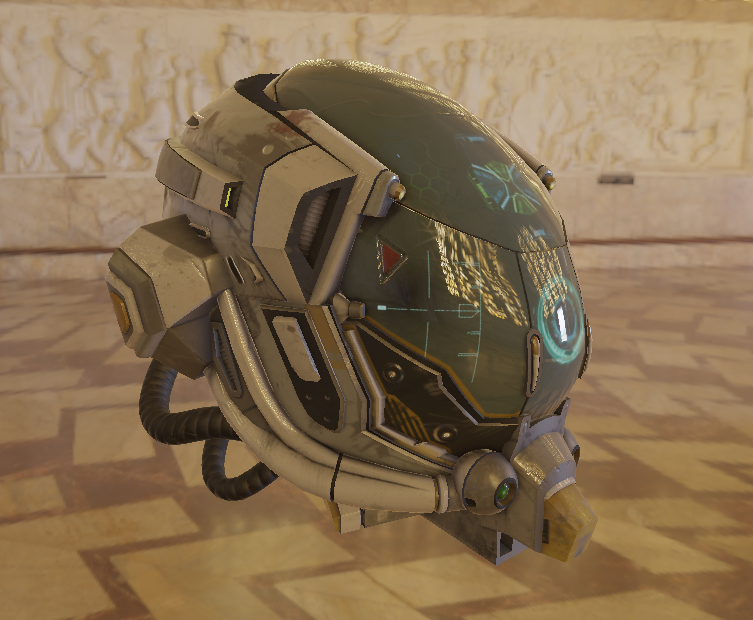
效果展示

在这里插入图片描述

在这里插入图片描述 切换为ACES Filmic Tone Mapping 在这里插入图片描述

 1
 2
 3
 4
 5
 6
 7
 8
 9
10
11
12
13
14
15
16
17
18
vec3 RRTAndODTFit(vec3 v)
{
    vec3 a = v * (v + 0.0245786) - 0.000090537;
    vec3 b = v * (0.983729 * v + 0.4329510) + 0.238081;
    return a / b;
}

vec3 ACESFilmToneMapping(vec3 color)
{
    // 适当的曝光缩放,可以视为手动曝光调整(可调参数)
    color *= 0.6;

    // ACES tone mapping 曲线
    color = RRTAndODTFit(color);

    // Clamp 到 [0, 1]
    return clamp(color, 0.0, 1.0);
}
📚 文章数: 72 ✍️ 总字数: 245.55K